


External hard drives are a popular choice for expanding storage, especially as they have shrunk to today’s compact models. However, given their portable nature, questions have lingered about their durability compared with an internal hard disk drive (HDD).
Many articles broadly claim that external hard drives last 3 to 5 years. These pieces often cite lower usage than desktop HDDs and warranty lengths as evidence.
So, our team analyzed a sample of thousands of external disks sent to us for data recovery services. It took a similar approach to our 2026 study on how long hard drives last.
Ultimately, we found that an external hard drive’s lifespan was more complex than a generic answer could convey.
Key Takeaways:
- The median external hard drive failed at 190 days. The average external disk in the sample lasted 665 days.
- 60.8% of external hard drives did not register a full year of operation. 49.6% of external devices did not reach the six-month mark. 2.2% of external disks spun for less than 24 hours.
- 27.2% of external hard drives failed with a current pending sector count of zero.
What Is the Lifespan of an External Hard Drive?
There isn’t a clear consensus regarding external hard drive lifespan.
Most industry sources place the lifespan of an external hard drive between 3 and 5 years. The 190-day median and 665-day average in our sample starkly contrast with the widely accepted figures.
However, the data reveals that the cause of external hard drive failure matters more than the median or average.
Inside Our Study of 3,453 Failed External Hard Drives
Methodology
As mentioned, we applied the same methods to this cohort as our previous studies on how long hard drives last.
Mean time between failure (MTBF) is one of the most common reliability metrics for hard drive lifespan. Manufacturers often list MTBF ratings for external hard drives in product guides. This number comes from large-scale testing in a controlled lab over a narrow time period. As a result, it does not account for user behavior. Running a disk in a warm, humid environment or transporting the device between locations can cause early failures.
Likewise, annualized failure rates (AFR) are another popular metric. Cloud storage platform Backblaze publishes AFR for specific models in its quarterly Drive Stats reports. Unfortunately, there isn’t a large enough fleet of external hard drives to track this data. Therefore, AFR only offers limited insight into external storage units with an enterprise HDD inside, such as a G-DRIVE PRO.
This study uses SMART (Self-Monitoring, Analysis, and Reporting Technology) attributes. SMART is a built-in tool that records usage metrics and detects hardware issues. It reports these values to the operating system to warn users of potential problems.
For this exercise, we analyzed SMART 9 (Power-On Hours) and SMART 197 (Current Pending Sector Count) values at the moment of failure.
This approach offers a glimpse into real-world external hard drive failures. It shows when and why many drives die rather than predict the lifespan of a specific disk.
This kind of autopsy is useful alongside a traditional survival census like MTBF or AFR.
Our Sample
The final sample included 3,453 external hard drives from five storage brands. It featured a mix of legacy models and modern drives.
The external hard drives were sent to us for professional data recovery services between January 2023 and June 2026.
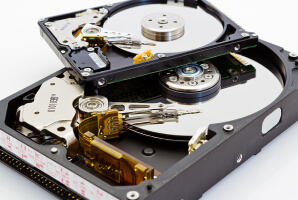
Each external HDD was diagnosed with mechanical failure, physical damage, or both. Failed read/write heads, a bad printed circuit board (PCB), or a broken spindle motor were among the most common issues.
Sometimes, platter damage destroys firmware modules in the Service Area (SA), a reserved region of the disk. Devices with damaged firmware can report unreliable SMART values. For that reason, we removed these outliers from the population.
We also excluded all external hard drives with logical errors. File corruption and lost partitions are not always a sign of hardware failure.
Finding #1: When External Hard Drives Fail in the Real World
The median external hard drive failed after 4,559 power-on hours. That figure equates to the disk spinning for nearly 190 days (6 months and 6 days) before it stops.
In that sense, the number falls well short of the 3- to 5-year estimates. However, an external hard drive running for 190 days over a 3- to 5-year span seems reasonable. It depends on how you frame the figure.
The sample size of manufacturers largely reflects their market share over the years. Western Digital (WD) and Seagate have shipped the most drives in the past decade.
Similarly, the manufacturer-level data depends on the failure types of disks sent to us. You can’t count on any external HDD to survive being dropped on the floor.
| Backup Methods Comparison | ||
|---|---|---|
| Backup Method | Advantages | Disadvantages |
| Cloud Backup | Automatic, scalable, accessible from anywhere | Requires internet access and ongoing subscription costs |
| External Hard Drive | Fast local backups and full control over data | Can be lost, stolen, damaged, or affected by local disasters |
| NAS | Centralized storage and convenient access across devices | Requires setup, maintenance, and protection from network threats |
| Offline Backup | Isolated from network-based attacks and ransomware | Requires manual management and physical storage |
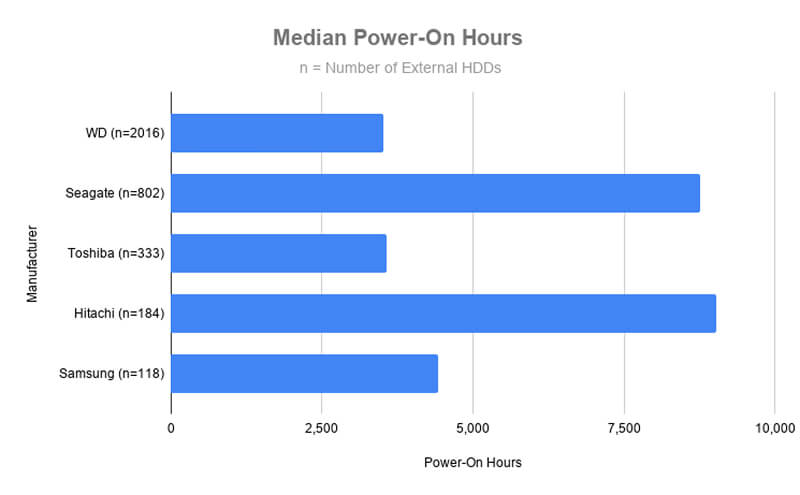
In contrast, the average external hard drive in the sample failed at 15,961 power-on hours. Thus, the external hard drives lasted an average of 665 days (1 year, 9 months, and 26 days).
This figure is much closer to the commonly reported range of 3 to 5 years.
| How Long External Hard Drives Last (Average) | |||
|---|---|---|---|
| Manufacturer | External HDDs | Power-On Hours | Pending Sectors |
| Western Digital | 2,016 | 14,010 | 1,103 |
| Seagate | 802 | 17,539 | 1,809 |
| Toshiba | 333 | 11,112 | 1,870 |
| Hitachi | 184 | 35,914 | 1,458 |
| Samsung | 118 | 20,843 | 272 |
| Total | 3,453 | 15,961 | 1,331 |
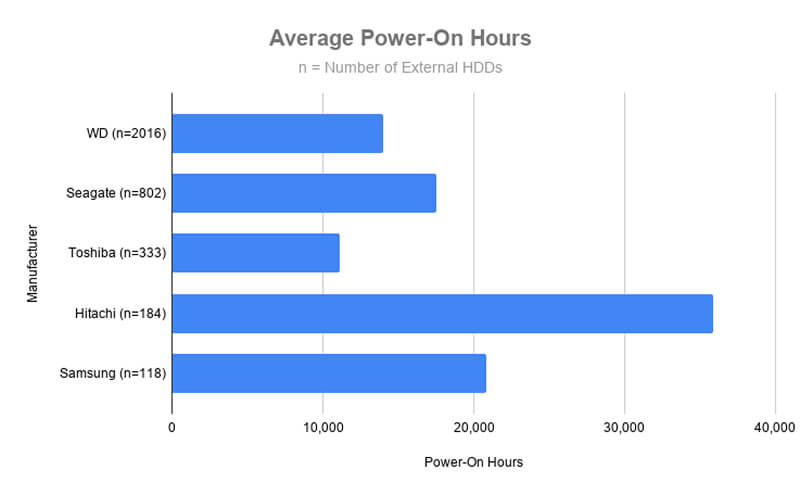
The gap between the median and average suggests many early failures and a fair number of long-lived disks.
Finding #2: When External Hard Drive Failure Rates Spike
External hard drives in the sample began failing almost immediately.
In fact, 2.2% of the external HDDs (76 drives) failed before they reached 24 hours. 49.6% of our sample (1,713 disks) didn’t last six months.
All told, 60.8% of the external hard drives (2,101 total) in the sample didn’t make it to the one-year mark.
It represents an 11% increase in disks failing within their first 365 days compared to our previous reviews of hard drive lifespan.
The table above shows the complete distribution of failures.
Despite the prevalence of early failures, hundreds of external hard drives still exceeded their expected lifespans, showing the variance.
For example, an 80 GB disk from 2002 spun for 124,292 hours before landing on our bench. Remarkably, the external device lasted a little over 14 years.
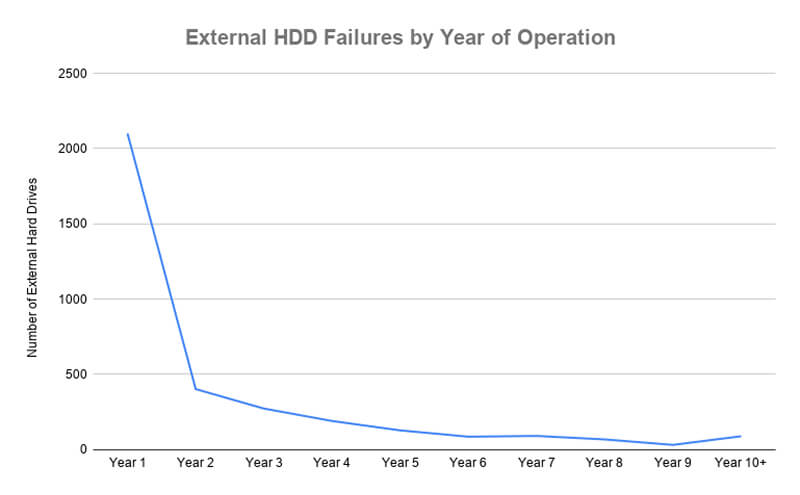
This line graph depicts when external hard drives failed. The massive spike in Year 1 shows the high amount of early-life failures in the population. After Year 1, the line gradually tapers off as random failures become less frequent and wear takes its toll.
Finding #3: What Kills External Hard Drives
Accidental drops, power surges, extreme heat, and manufacturing defects are the leading causes of failure in this cohort.
Current pending sector count reveals the number of unstable sectors on the disk’s surface. This value often serves as a proxy for a failing hard drive.
Yet, more than one-fourth of HDDs (27.2%) in the sample failed without a single current pending sector. There was zero warning that failure could be imminent.
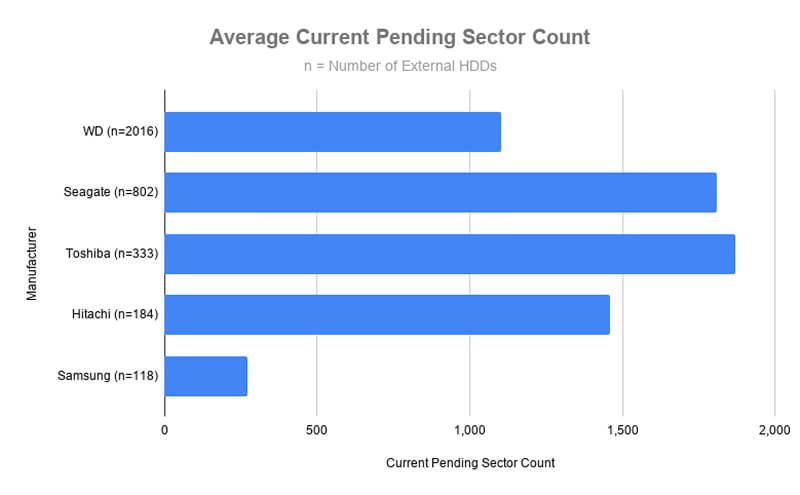
The bar graph displays the average current pending sector count for each brand’s disks. Their median figures were much closer to zero. Outliers failed with thousands of current pending sectors.
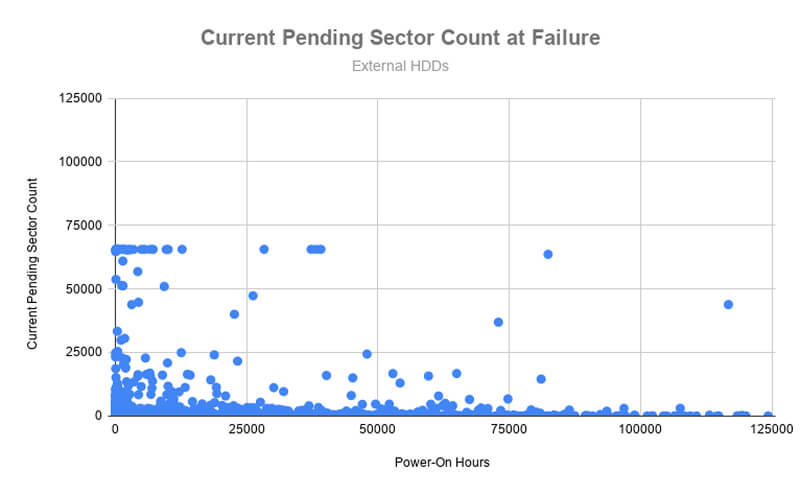
The scatter plot shows each disk’s current pending sector count at its moment of failure. The variance in this relationship shows that current pending sector count alone is not a reliable metric for lifespan.
What This Means For Your External Drive
External hard drives can fail at any time.
You could get lucky with an external hard drive that lasts for years without incident. You might get an external device that works great until a power surge fries components on its PCB. Or you may get an external disk that falls off the desk shortly after buying it.
You don’t know. Which is why you should always prepare for failure.
Most people use external hard drives for portable storage, local backups and archives, or offloading. Each of these uses carries a heightened risk of failure. Using an external drive to transport data between home and the office or school exposes it to jostling and impacts. Local backups, archives, or media libraries could get knocked off your desk.
The 3-2-1 Rule for backups reduces the risk of data loss. It creates three copies of files on two different media, with one set stored off-site. This setup protects data by spreading it across multiple devices and locations, so hardware failure isn’t a setback.
How To Make Your External Drive Last Longer
As mentioned, physical damage from sudden impacts and voltage spikes is likely a cause of external HDD failure. Taking meaningful steps to reduce the likelihood of these situations can prolong the life of your portable hard drive.
For instance, keep an external hard drive in a well-ventilated area away from the edge of your desk. Ensure sufficient padding when you travel with the disk. Use an uninterruptible power supply (UPS) with your PC to protect the connected device. Each step lowers the risk of an unexpected event causing physical damage that kills your drive.
We also feel that following two other tips could extend your external hard drive’s lifespan.
First, always safely eject the device before unplugging it from a desktop or laptop. You can safely eject external storage in the system tray on Windows or Finder sidebar on Macs. Doing so allows the computer to complete pending write requests. Interruptions can corrupt the file system.
Secondly, our experts strongly recommend using a native file system on your external hard drive.
How To Check Your External HDD’s Health
Obviously, catching problems before they happen is ideal.
While you can’t predict every failure, you can still monitor your external hard drive’s health with several tools. These tools detect more routine issues. CrystalDiskInfo is free, open-source software to review SMART data on Windows PCs. Some brands release programs for their products, such as WD Discovery for Windows and macOS or Seagate SeaTools.
Warnings and critical errors demand your immediate attention. Examples of urgent concerns include Reallocated Sector Count (SMART 5), Current Pending Sector Count (SMART 197), and Uncorrectable Sector Count (SMART 198).
Many USB enclosures cannot interpret SMART values from the host system. Using a cheaper bridge chip in the enclosure that does not support this translation saves production costs.
Key Takeaways on How Long External Hard Drives Last
Here’s what we found from our sample of 3,453 failed external hard drives:
- The gap between the median (190 days) and the average (665 days) shows how common early failures are.
- 60.8% of external hard drives in the study did not register a year’s worth of power-on hours.
- 27.2% of external HDDs had zero pending sectors at the time of failure.
As stated, SMART attributes paint a different picture for hard drive failure. Yet, these values offer useful, real-world insights for external hard drives that other metrics cannot.
However, these findings still reflect a sample of failed external disks sent to us for data recovery services. Therefore, it will likely include more early failures than the broader population.
You should not view this data as predictive for a specific external device. Rather, it describes when actual external hard drives failed in the real world, and best complements other reliability metrics.
Secure Data Recovery is a global leader in the hard drive data recovery industry. Our certified engineers have recovered billions of files across more than 100,000 cases of data loss.
Frequently Asked Questions
What is the most common cause of external hard drive failure?
Physical damage, mechanical breakdowns, and human error are the most common causes of external hard drive failure. Physical damage occurs when drops or mishandling destroy the magnetic platters or electronic components. Mechanical failure involves broken read/write heads or a seized spindle motor. Improperly ejecting an external hard drive from a computer can cause file corruption.
Can an external hard drive last 10 years?
An external hard drive can last 10 years, but it is not considered normal. Most experts claim a much shorter lifespan. Sources in the storage industry commonly cite a lifespan of 3 to 5 years. Our own study yielded a 190-day median and 665-day average, based on SMART values for power-on hours.
Do external hard drives go bad if they are not used?
Yes. An unused external hard drive degrades over time. These disks use lubricants and microscopic tolerances for smooth operation while spinning. Lubricants can dry out, and high temperature or humidity could alter the geometry of internal components. In addition, magnetized regions on the platter surface will decay over long periods.
Power up disks every six months to avoid these issues.
Can data be recovered from a dead external hard drive?
Yes. You can often recover data from an external hard drive. Our external hard drive recovery services have helped thousands of people restore data on their portable devices. Odds of success depend on the failure type and the extent of the damage.
Stop running your external hard drive if you suspect hardware failure. Continuing to use it could worsen the problem and lead to permanent data loss.
How often should I replace an external hard drive?
Most experts recommend replacing your external hard drive every 3 to 5 years. However, the unpredictable lifespan of external HDDs suggests you should plan to replace them sooner. A clicking hard drive or a beeping disk is a strong sign of imminent failure.
The wide range in how long an external hard drive can last should also influence your backup practices.

Timothy Burlee

Timothy Burlee is a content writer for Secure Data Recovery Services. He specializes in various topics in the data industry, including data recovery technology, storage devices, and digital forensics. Throughout his career, he has covered complex concepts and provided accessible solutions for users. Before joining Secure Data, he worked as a freelance technical writer.




.png)
