A hard drive can suffer serious liquid damage after a flood, accidental submersion, a coffee or soda spill, or even just being exposed to high humidity for a long period of time. Water can affect both the drive’s internal electronics and the intricate mechanical components inside its enclosure.
Even if the outside seems dry, moisture, contamination, or corrosion could still be present inside. That’s why it’s important to follow one key rule after a water-exposure incident: do not power on your drive just to see whether it still works. Doing so can turn a potentially recoverable problem into a much more serious failure.
In this guide, we’ll go over whether water-damaged hard drives can be recovered, how different liquids affect them, what you should do immediately, what to avoid, and how professional recovery works in these situations.
Can You Recover Data from a Water-Damaged Hard Drive?
Often, you can — but the likelihood and complexity of the recovery depend on how badly your drive was affected and what happened after the liquid exposure.
Here are a few important factors that affect whether or not you can recover data from a water-damaged hard drive:
- Whether the HDD was powered when it got wet
- How long it was submerged or exposed
- Whether liquid entered the drive enclosure
- Whether corrosion or other contamination is present
- Whether anyone tried to power, open, dry, or clean the drive
- The condition of the platters and read/write heads
A hard drive that no longer spins or mounts, or isn’t being detected by your computer hasn’t necessarily lost its data. If the platters are still usable, specialist recovery could still be possible even if the drive’s electronics or mechanical components have failed.
For a more in-depth look at physically damaged drives and what may still be recoverable, take a look at our guide to recovering data from broken hard drives.
How Does Water Damage a Hard Drive?
A hard disk drive (HDD) consists of various precision components: magnetic platters, read/write heads, an actuator assembly, a spindle motor, a printed circuit board (PCB), and more. The platters spin at high speed while the read/write heads operate extremely close to their surfaces to read and write the data stored on them.
Liquid exposure can affect these components in several ways. Water could cause electrical shorts, PCB corrosion, oxidation, or mineral deposits, while contamination inside the drive can affect the motor, heads, or platter surfaces. Liquids that contain sugar, salt, or dirt can be especially problematic, too, since they may leave behind residue even after all visible moisture has evaporated.
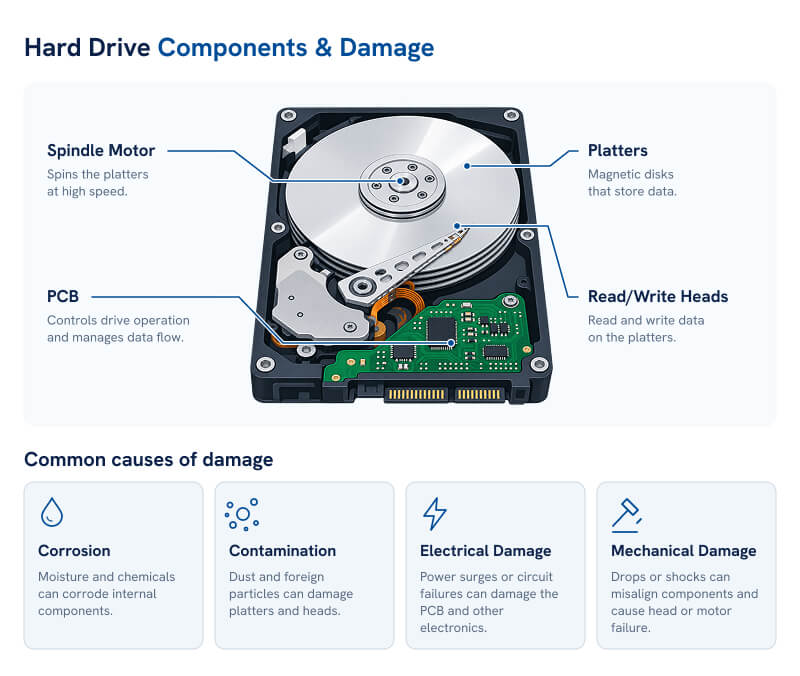
That’s why a drive that appears to be dry may still be unsafe to power on. Our broader guide to water-damaged device data recovery explains in detail how moisture can also affect phones, laptops, SSDs, and other storage devices.
Why the Type of Liquid Matters
Not all liquid exposure has the same impact on a hard drive. The kind of liquid the drive was exposed to can affect the type of contamination, the speed of corrosion, and the recovery process that may be required.
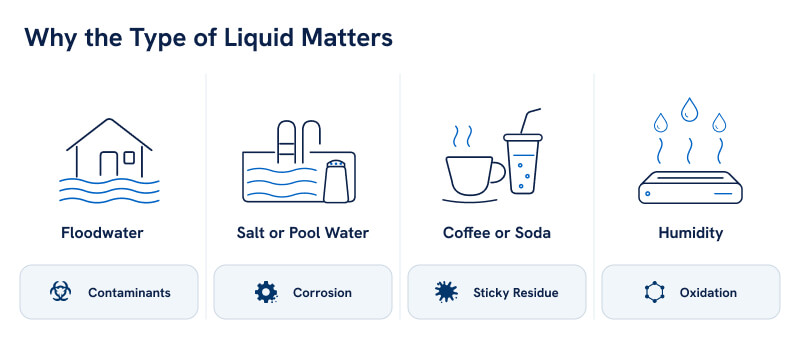
Flood or Sewage Water
Floodwater can carry dirt, sediment, chemicals, and organic contaminants, which remain on your hard drive’s components after the water itself has dried. A submerged HDD shouldn’t just be dried out and powered back on. If your hard drive has been exposed to a flood, our guide to data recovery after floods and other disasters covers these risks in more detail.
Pool or Salt Water
Salt, chlorine, and other dissolved substances can leave conductive or corrosive residue behind, potentially accelerating damage to the drive’s exposed electronics and components.
Coffee, Soda, and Other Drinks
Sugars, acids, milk, and other ingredients can dry into sticky deposits that remain even after visible moisture disappears.
Humidity and Condensation
High humidity doesn’t usually carry the same degree of risk as submersion, but prolonged exposure can still contribute to corrosion and degradation. ASHRAE notes that most HDDs aren’t hermetically sealed, so extended exposure to excessive humidity can have a lasting impact on the drive’s health.
Hard Drive vs. SSD Water Damage
Hard drives and SSDs are both vulnerable to serious liquid damage. However, the way that damage affects them can be very different — and as a result, the techniques used to recover data from them vary, too. This is due to several factors, but the key difference is the mechanism each drive uses to store data. Hard drives store data magnetically on spinning platters, while SSDs store data electronically in NAND flash.
Intuitively, it may seem like SSDs are immune to water damage just because they don’t have any moving parts. This is not the case, SSDs are still susceptible to water damage. If one is powered on while wet, its electronics can still suffer shorts, corrosion, and component failure.
For a broader comparison of the two types of drive, see our guide to HDDs and SSDs.
What to Do with a Water-Damaged Hard Drive
If your hard drive gets wet, the safest approach is simple: stop using it immediately and avoid anything that could make the damage worse. The steps you take shortly afterward can have a major impact on the chances of recovering your data.
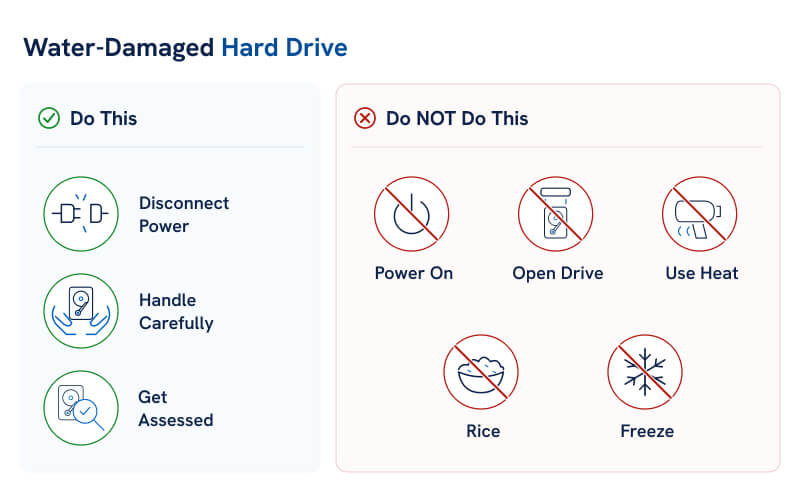
What to Do Right Now
- Disconnect power immediately
If it’s an external drive, unplug it as soon as it’s safe to do so. And if the affected drive is inside your computer, shut the system down and leave it powered off. Do not, under any circumstances, reconnect the drive just to see if it still works.
- Handle the drive as little as possible
Avoid shaking, tilting, dismantling, or otherwise moving the drive unless absolutely necessary. If contaminants have already reached its internal components, extra handling can complicate (and in some cases, spread) the damage.
- Leave internal drying and cleaning to professionals
Even if you know what you’re doing, avoid opening the drive enclosure to help it dry. Internal hard drive components require controlled handling, and being exposed to airborne particles can create additional problems.
- Record what happened
If possible, make a note of:
- The type of liquid involved
- How long the drive was exposed
- Whether it was powered at the time
- Whether it was fully submerged
- Any attempts already made to dry, clean, or power it
This information can help during diagnosis.
- If the data matters, seek professional assessment
Professional evaluation is especially important after full submersion, saltwater or dirty-water exposure, or if the drive is if the drive fails to mount, spin normally, or makes unusual noises.
What Not to Do
The internet is full of DIY fixes for wet hard drives, but a lot of them can actually do more harm than good. Avoid these common “fixes” that may reduce your recovery options:
- Do not power the drive on
- Do not repeatedly reconnect it
- Do not open the HDD
- Do not use a hair dryer, oven, radiator, or heat gun
- Do not put the drive in rice
- Do not freeze it
- Do not clean the platters or internal components yourself
Powering damaged electronics can worsen electrical faults, and opening or cleaning the drive without the right environment and equipment can introduce contamination or physically damage your drive’s delicate internal components.
How Professional Water-Damaged Hard Drive Recovery Works
Professional recovery focuses on getting your damaged drive stable before attempting to access the data on it. The exact process depends on whether the problem is electrical, mechanical, contamination-related, or a combination of several types of damage.
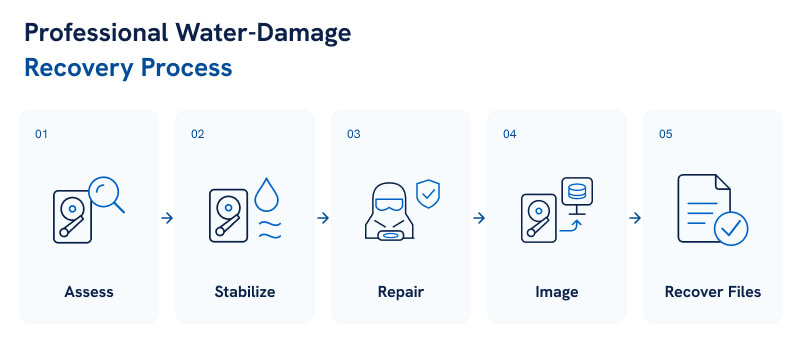
The Professional Recovery Process
- Diagnostic assessment
The first step of the recovery process involves engineers assessing your drive to determine which of its components have been affected and whether liquid or contamination has reached the internal enclosure.
- Stabilize the drive
Damaged or contaminated components are cleaned, repaired, or isolated as needed, after which engineers attempt to read data from the device.
- Repair components where needed
Depending on the damage your drive has sustained, this may involve:
- PCB or other electronic repairs
- Compatible donor components
- Read/write head work
- Mechanical stabilization
- Create a sector-by-sector image
Once the drive is stable enough to access, engineers attempt to copy as much readable data as possible onto reliable storage, using sector-by-sector imaging. This limits the amount of additional stress placed on the damaged original.
- Extract and verify files
Once engineers have a sector-by-sector image of your drive, they use this to continue the recovery process where possible. This allows your files to be reconstructed and checked without having to repeatedly access the original drive.
The process prioritizes recovering your data — not attempting to make the water-damaged drive reliable for continued use.
Why Cleanroom Recovery May Be Necessary
Not every wet hard drive needs to be opened. If the damage is limited to external electronics, engineers may be able to work on the drive without needing to access its internal mechanical components.
However, cleanroom work may be required if any of the following apply to your drive:
- Liquid has entered its internal enclosure
- The platters need inspection or specialist cleaning
- The read/write heads require replacement
- Internal contamination is suspected
Hard drive components operate at extremely tight margins. Because of this, dust and other airborne particles can potentially cause problems when a drive is opened. At Secure Data Recovery, we maintain a Class 10 ISO 4 cleanroom specifically for cases like these that require internal hard drive work.
Recover Data from a Water-Damaged Hard Drive
If your hard drive has been exposed to water or another liquid, avoid powering it on, opening the enclosure, applying heat, or repeatedly reconnecting it to see whether it still works. Those actions can add complications to a recovery that, depending on the extent of damage, may already be difficult.
At Secure Data Recovery, we handle water-damaged HDDs, external drives, SSDs, RAID systems, and other storage devices. We offer free diagnostics, maintain a Class 10 ISO 4 certified cleanroom for physical hard drive recovery, and have an industry-leading 96% recovery success rate over nearly two decades.
Our standard services are also backed by our signature No Data, No Recovery Fee guarantee — we won’t charge you a cent unless we’re able to get your data back.
If your data matters, call us at 800-388-1266 or start a case online to have your water-damaged storage professionally assessed.

Monica J. White

Monica is a tech journalist with a lifelong interest in technology. She first started writing over ten years ago and has made a career out of it, with a particular focus on PCs, mobile devices, SaaS, and cybersecurity. She enjoys the challenge of explaining complex topics to a broader audience, whether it's how semiconductors work or how to back up your data. Her work has previously appeared in Digital Trends, Tom's Hardware, Pay.com , SlashGear, Forbes, Springboard, Looper, Money, WePC, and more.