


People often treat cloud storage as one of the safest ways to back up their important data. It’s certainly convenient, but not always safe: a recent AWS incident highlights why cloud storage should never be your only line of defense.
Amazon Web Services said that some customer data stored in facilities in Bahrain and one availability zone in the UAE could no longer be restored after the infrastructure was physically damaged during strikes earlier in 2026. Fires, power outages, and water damage worsened the disruption, while customers with working backups or migrated workloads were able to restore operations elsewhere.
Of course, this is an extreme scenario. Still, the lesson applies beyond geopolitical conflict. Cloud storage minimizes a lot of the risk involved with keeping data in a single home, office, or device, but it doesn’t fully eliminate the risk of data loss.
If your cloud copy is your only backup, you effectively just have one backup. A safer approach is to spread your important data across multiple storage types and locations.
What Happened to AWS Data in Bahrain and the UAE?
AWS facilities in Bahrain and the UAE were physically damaged during strikes in March 2026. This caused extended outages across parts of the company’s regional infrastructure. In Bahrain, the damage affected multiple AWS facilities, while one availability zone in the UAE was also impacted.
After the attacks, AWS advised customers to migrate workloads and data to other regions, including Europe and the US. According to the Wall Street Journal, most customers did indeed do so before further strikes hit the AWS facilities in Bahrain in April.
For those who remained affected, AWS later said it helped customers re-establish operations in alternate regions using backups (where available) or other workarounds. However, some data that had remained exclusively in the damaged infrastructure couldn’t be restored, as confirmed by the company in an AWS Health Dashboard update on September 15.
This distinction is important. This wasn’t a case of every AWS backup suddenly disappearing. Instead, it showed what can happen when important data doesn’t have sufficient geographic or backup redundancy.
This incident is a rare example of a physical geopolitical conflict affecting major cloud infrastructure, but the underlying lesson is a broader one: even highly resilient cloud systems can be vulnerable if they rely too much on a single location or copy.
The Cloud Is Still Physical Infrastructure
Cloud storage sounds like a sort of abstract phenomenon, but it’s not; ultimately, the cloud relies on physical infrastructure that’s located somewhere. That means servers, storage devices, networking equipment, cooling systems, and power supplies housed within real data centers.
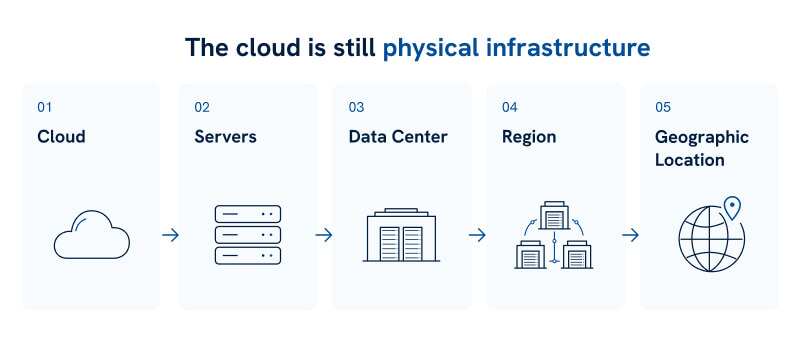
Cloud providers like AWS generally build strong redundancies into these facilities. Still, no physical location is completely immune to unpredictable events like drone strikes, as well as:
- Fire
- Flooding
- Power failure
- Natural disasters
- Physical damage
- Widespread regional disruption
AWS Regions are divided into multiple Availability Zones, which are designed to help isolate failures. For organizations that need protection against an event that affects an entire region, AWS also recommends disaster-recovery strategies that copy workloads and data across multiple regions.
AWS also emphasizes that customers share responsibility for the resilience of their own data. In other words, the company recommends that customers also take measures like backups, versioning, and replication.
This is why the lesson from the Bahrain and UAE incident isn’t that cloud storage is inherently unsafe. In fact, cloud storage can (and should) be an important part of any resilient backup strategy. It just shouldn’t be the entire strategy.
Using cloud storage isn’t the problem. Relying entirely on one cloud location, account, provider, or copy is.
Why One Cloud Backup Can Still Be a Single Point of Failure
Cloud storage can offer excellent redundancy, but a cloud-only backup strategy can leave you exposed if every copy shares too many of the same dependencies.
For example, your backups may all be in the same cloud region, depend on the same cloud account credentials, or remain continuously connected to the same systems. This means a provider outage, account lockout, configuration mistake, ransomware attack, or regional disruption could then affect several of your copies at once.
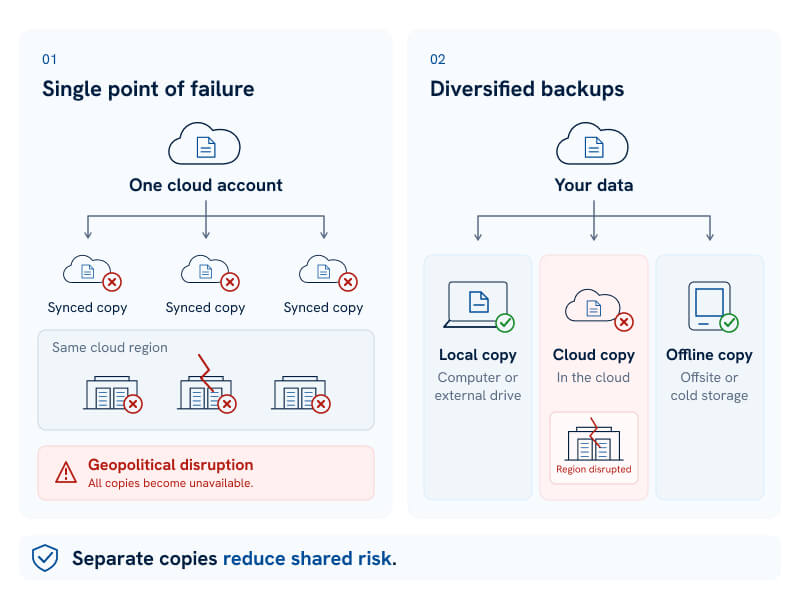
This is also why syncing isn’t always the same thing as backing up. If you accidentally delete a file, or it gets corrupted or encrypted by ransomware, that change may automatically synchronize everywhere. And in that scenario, you could simply end up with multiple copies of the same damaged data.
When it comes to protecting against data loss (and especially for ransomware attacks), CISA recommends maintaining offline backups because ransomware can search for accessible backups and encrypt or delete them.
Geographic separation can help reduce another shared risk. For instance, AWS allows backups to be copied automatically across different regions. The company describes cross-region backup as useful when organizations need continuity or geographic separation from their production data.
The goal isn’t to abandon cloud storage entirely. It’s to avoid relying on any one copy, medium, account, or location as your only line of defense.
The 3-2-1 Backup Rule Still Solves the Core Problem
One of the simplest ways to avoid relying too heavily on any single backup is the 3-2-1 backup strategy. Here’s what it involves:
- Keep 3 copies of your important data: the original plus two backups
- Store those copies on 2 different types of storage media
- Keep at least 1 copy offsite
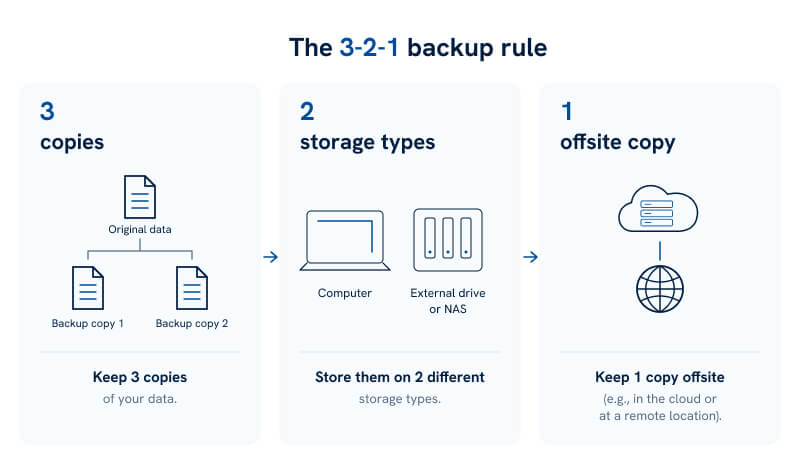
CISA recommends this approach because separating your copies across different devices and locations reduces the chance that one incident can cost you all your data at once. And at Secure Data Recovery, we believe this is a prudent way to safeguard your data, too.
Let’s take a look at how some 3-2-1 backup setups look in practice.
Example for a Home User
A straightforward setup might look like:
- Your original files stored on your computer’s SSD
- A local backup on an external hard drive or NAS
- A separate cloud backup stored offsite
If the computer fails, you have your local backup. If a fire, theft, or other incident affects both devices at home, you still have the offsite cloud copy available.
Example for a Business
Businesses can apply the same principle at a larger scale:
- The production copy of business data
- A separate local or on-premises backup system
- An offsite backup, potentially in another geographic region or with another provider
The important part is diversity, not simply the number of copies. Three backups sitting in the same building, cloud region, or other shared failure domain can still be vulnerable to the same incident, defeating the point of having multiple backups.
3-2-1 is relevant to the AWS story because it’s designed to prevent one hardware failure, disaster, cyberattack - or in this case, regional geopolitical disruption - from becoming a total data-loss event.
Our broader guide to various data backup methods explores the same idea, too: redundancy works best when your copies don’t all share the same risks.
How to Build a More Resilient Backup Strategy
For a backup strategy to be truly resilient, it should be driven by a key principle: no single failure should be able to reach every copy of your data.
In practice, that means combining different storage locations, media, and recovery options rather than relying on one system.
Here are a few practical steps that can help:
- Keep a local backup: An external HDD, SSD, or NAS gives you fast access if your cloud service is temporarily unavailable.
- Keep an offsite copy: Cloud storage or another remote location protects against fire, theft, flooding, and other events affecting your home or workplace.
- Separate critical copies geographically: Businesses using cloud infrastructure should consider cross-region redundancy. AWS allows backups to be copied to other Regions automatically or on demand for additional resilience and business continuity.
- Don’t rely solely on sync: Use version history, snapshots, or another system that preserves older versions of files.
- Consider an isolated backup: We recommend maintaining offline, encrypted backups because ransomware may attempt to find, encrypt, or delete accessible backups.
- Automate your backups: A good backup plan is far more useful if it runs automatically and doesn’t rely on you remembering to back up files manually.
- Test restores regularly: Regularly ensure you can actually access and restore from your backups when needed.
The right setup depends on how critical your data is. A family photo archive and a business-critical database may require very different levels of protection, but both benefit from avoiding a single point of failure.
Don’t Let One Failure Take Out Every Backup
There’s no doubt that the AWS incident in Bahrain and the UAE was an extreme and unusual case. Still, that’s exactly what a good backup strategy is meant to prepare for: events you can’t foresee.
Cloud storage absolutely remains a viable part of that strategy. It offers offsite protection, automation, scalability, and the ability to separate your data geographically. The mistake is allowing one cloud copy to become your final line of defense.
A stronger approach combines local and offsite storage, follows the 3-2-1 backup rule, separates critical copies across different failure domains, and tests backups regularly to make sure they can actually be restored.
When Backup Protection Isn’t Enough
If your local HDD, SSD, NAS, RAID array, or other storage device fails, and you don’t have a usable backup, Secure Data Recovery can help.
We can assess the device and determine the safest recovery approach for your specific case. Our recovery success rate is an industry-leading 96%, and we offer free diagnostics and a No Data, No Recovery Fee guarantee — we won’t charge you unless we recover your data.
If you’ve lost access to your data, don’t wait. Call us at 800-388-1266 or start your case online today!

Monica J. White

Monica is a tech journalist with a lifelong interest in technology. She first started writing over ten years ago and has made a career out of it, with a particular focus on PCs, mobile devices, SaaS, and cybersecurity. She enjoys the challenge of explaining complex topics to a broader audience, whether it's how semiconductors work or how to back up your data. Her work has previously appeared in Digital Trends, Tom's Hardware, Pay.com , SlashGear, Forbes, Springboard, Looper, Money, WePC, and more.








.png)
