


Every storage device has an expiration date. But hardware failure is just one cause of sudden data loss. Data loss refers to the deletion, corruption, or destruction of digital information on a device. It can be the result of an accident or a malicious act.
There are two main types of data loss: logical and physical.
Logical data loss occurs when the device itself is fine, but the stored data is inaccessible.
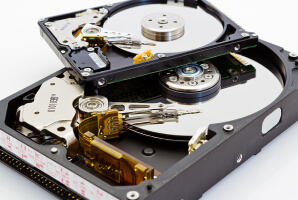
Physical data loss involves damage or defective components that prevent the device from working properly. Mechanical failures in hard drives are a popular subset of physical data loss.
However, a device can experience both logical issues and physical damage simultaneously, complicating some cases. Our experts outline the different types of data loss and common causes in this guide.
Key Takeaways:
Unfortunately, data loss is more common than many people realize. Drives fail. People make mistakes. An unforeseen event can destroy a device.
Over the years, we have seen every kind of data loss imaginable at our labs. Each case falls into one (or more) of these eight categories.
Here are the most likely causes of data loss. Starting with one of the most common reasons for a device to land on our bench:
Human Error
Many incidents happen on an ordinary day without notice. No catastrophic failure or data breach from a hacker. It could just be a mind that wanders for a moment and accidentally deletes files or formats the wrong device.
Other examples of human error include forgotten passwords, interrupted file transfers, unplanned sync, or bad RAID configurations.
Hardware Failure
Every device fails eventually. Hard disk drives (HDDs) have moving parts that wear out. Solid-state drives (SSDs) have a finite number of writes. All media can feature defective components from production. Sometimes there are signs of hardware failure, such as unusual sounds or sluggish performance. On other occasions, the device just dies with no warning.
These failure types are internal and gradual.
Physical Damage
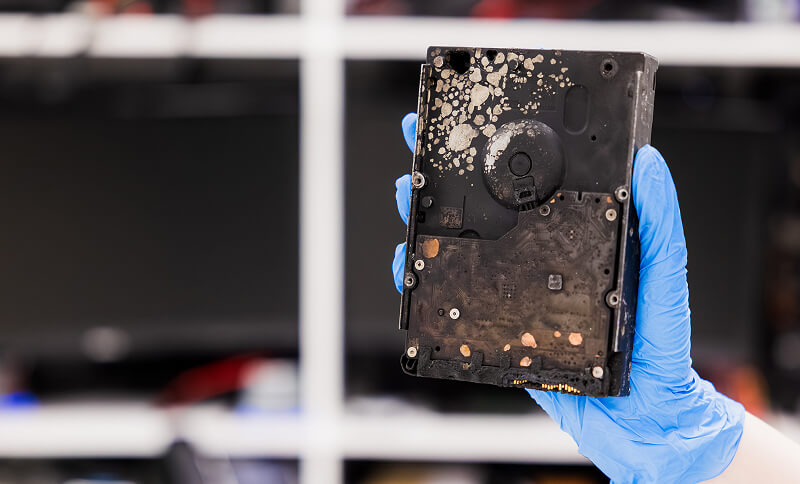
Physical damage refers to abrupt events that degrade the media or components within the device. External events that inflict physical damage include dropping an external hard drive or laptop or spilling water on a computer. A perfectly healthy device that could have kept running for years suddenly fails.
Careful handling and protection from harmful conditions are crucial to minimizing the chance of physical damage.
File Corruption
A device can still fail even if the hardware works fine and humans use it as intended. File corruption occurs when stored data becomes scrambled or unreadable. Corruption typically happens due to improper ejection of removable media, an interrupted write operation, a software bug, or a failed update.
Proper shutdowns and safe ejects prevent most cases of corruption.
Power Outage and Voltage Spike
As mentioned, a sudden power outage while saving data can corrupt files on the device. In addition, a voltage spike can ruin electronics on the printed circuit board (PCB) in an instant.
A surge protector or universal power supply (UPS) acts as insurance against both events.
Malware and Ransomware
Malware and ransomware are rising examples of data loss. Malicious software can delete or corrupt files and folders on a storage device. However, a ransomware attack is among the most complex cases, as it holds data hostage to demand payment.
Professional data recovery services seek to restore files without budging to an attacker’s financial demands. In fact, ransomware recovery is often safer than paying the ransom.
Natural Disaster
Floods, hurricanes, and wildfires are three devastating natural disasters that can completely destroy a device. Beyond extreme heat and water damage, natural disasters pose a broader threat of data loss. Storing all copies of data in the same location could mean the original files and backups are wiped out together.
Keeping one copy of files offsite improves redundancy and lowers the odds that a single event will cause catastrophic data loss.
Device Loss or Theft
A stolen laptop or smartphone is the worst-case scenario. In that case, the device is gone, along with the data stored on it. When that happens, there is nothing that can be done.
Backing up data and encrypting files are the best strategies to reduce the impact of device loss.
The answer to this question determines the next steps. Knowing what you are dealing with is essential to recovering files. One wrong step could easily worsen the problem and lead to permanent data loss.
The following table compares recovering data from a storage device with physical damage and logical errors:
Logical Failures: When You Cannot Access Data
Logical data recovery is the process of restoring files that were lost due to human error, corruption, malware, or software conflict.
Logical failures have a wide range of possibilities. Sometimes, the lost data is fairly easy to access or repair. Free data recovery software or paid tools can frequently resolve simple cases in a matter of minutes.

Consumer products cannot handle severe logical issues.
A skilled engineer with cutting-edge utilities is the most reliable solution to recover data lost due to logical errors.
Logical data recovery includes:
- Permanently deleted files on an HDD, SD card, or thumb drive
- Data stored on a recently formatted device
- File system corruption
- Partition loss or unmounted disks
- Bad rebuild or wrong drive order for a RAID using network storage
- Malware infections
- Hardware encryption, like BitLocker, or software encryption methods
Tip: Do not install file recovery software on the storage device with lost data. Doing so could overwrite data. Save all recovered files to a folder on a separate drive. Having a new location could prevent writing over lost files in the target drive’s free space.
Physical Failures: When Your Device Itself Stops Working
Physical data recovery uses advanced tools to repair damaged hardware, temporarily restoring its function to retrieve files.
These repairs often demand years of practice, custom tools, a large collection of donor parts, and a modern cleanroom. A cleanroom is a controlled lab that filters dust and other harmful particles from the air. This environment helps protect the storage medium from further damage.
A partial recovery could be the best-case scenario, depending on the extent of the device's damage.
Here are some common physical issues that may require data recovery:
- Damaged platters in hard disk drives
- Mechanical failure of read/write heads, spindle motor, or actuator arm
- Broken connectors, shorted electronics, and torn pads on the PCB
- Damage to the NAND package or firmware in SSDs, mobile devices, memory cards, or USB flash drives
- Cracked shell, bent pins, and worn contacts for microSD cards
- Corrosion or thermal damage to the media
Data recovery software cannot recover data from a device with physical damage. Running these programs on a broken hard drive might make the situation even worse.
Learn more about choosing a provider if you are unsure why your device failed and need a professional service.
When You Need Both Physical and Logical Data Recovery
A lot of cases are not purely physical or logical. Some require both approaches.
For example, RAID combines multiple drives into a single logical volume. In many cases, the RAID controller stripes data across disks in the array.
So, a disk with a head crash needs hard drive repair before technicians can image its contents. Then, engineers must consider several logical structures during the rebuild process, such as stripe size, block order, parity, and disk sequence.
As a result, the work addresses physical damage and logical issues in tandem.
Even straightforward recoveries can become a multi-stage project.
The first step following data loss is essential: Stop using the device to avoid making the problem worse.
Do not power cycle the device or run software tools on it. Especially if the device makes abnormal noises or behaves erratically. That is how sudden data loss becomes permanent.
If the device is failing without a clear sign of failure and contains important data, then do not gamble.
Call 800-388-1266 or fill out a form to get a free quote and reclaim what matters most.
Although you can lose files in a number of ways, one simple rule prevents the vast majority of data loss events.
The 3-2-1 Rule recommends storing 3 copies of data on 2 different devices, with 1 version stored offsite.
In practice, the 3-2-1 Rule would mean duplicating a desktop or laptop to an external hard drive for local backups. Then, upload one copy of files to the cloud for geographic redundancy.
It is an effective, simple solution.
Frequently Asked Questions
What are the most common causes of data loss?
Human error, hardware failure, physical damage, and file corruption are the most common data loss scenarios. These data loss events account for the majority of cases seen by engineers in our Class 10 ISO 4 cleanrooms. Each case requires a different approach to achieve the best results.
Can permanently deleted files be recovered?
Often. In most cases, permanently deleting files does not erase them from the storage medium. It merely marks the space as free for new data to be written. The data still exists on the platters or flash memory cells. Data recovery experts can retrieve data without the standard roadmap. However, an SSD differs slightly from other devices. SSDs receive a TRIM command that purges data from NAND storage almost instantly.
How much does professional data recovery cost?
It depends. The cost of data recovery varies based on the failure type, the extent of the damage, the amount of files, and the desired timeline. For that reason, we present a detailed report with a fixed, free quote, so you know exactly what to expect. And we offer a No Data, No Recovery Fee guarantee. You get your data back, or pay nothing.
Is data recovery covered by warranty or insurance?
A warranty rarely covers data recovery services. Typical warranties only extend to the hardware itself. Not the data stored on the device. However, specialized insurance may cover data recovery services. Coverage varies widely. Check your policy for specific details.
Does formatting a storage device erase data?
A quick formatting clears data on the device and prepares it for a new file system. Therefore, it is possible to recover data from a hard drive, memory card, or USB flash drive after an accidental deletion. In contrast, a full format overwrites the entire drive with random data, making recovery impossible.
Even a quick format on an SSD could lead to permanent data loss. The OS directs the SSD to instantly delete data to optimize its long-term performance.

Timothy Burlee

Timothy Burlee is a content writer for Secure Data Recovery Services. He specializes in various topics in the data industry, including data recovery technology, storage devices, and digital forensics. Throughout his career, he has covered complex concepts and provided accessible solutions for users. Before joining Secure Data, he worked as a freelance technical writer.








.png)
