


Firmware is embedded software in hard disk drives (HDDs) that provides operating instructions, from spinning up the platters to locating data.
Hard drives divide the microcode between a chip on the printed circuit board and the service area (SA) on magnetic platters. It acts as a bridge between the hardware and software layers of a computer.
When a hard drive’s firmware becomes damaged, the device can start to deteriorate gradually or fail instantly. In most cases, your data is still intact on the disk despite firmware damage. However, damaged firmware modules require repair to access your files.
What To Know:
What Is Hard Drive Firmware?
Firmware is low-level software that controls all functions inside a hard drive.
Firmware exists below the operating system (OS) and user-installed programs. The microcode is written to each hard drive during production to optimize performance. It initiates the startup sequence, communicates with the computer, contains calibration data, maps read/write heads, manages bad sectors, and monitors errors. Without firmware, the device will not work.
Hard drives store firmware in two locations. One set of firmware is embedded in a read-only memory (ROM) chip on the PCB. ROM chips help translate requests from the PC and hold adaptive data tailored to the specific drive’s characteristics. The other portion of firmware resides in the service area. The service area is a reserved region on the innermost or outermost tracks on the disk. It is hidden from the host system and users to protect its integrity.
This split design means that hard drive repair for firmware damage begins by finding the source of the problem.
Firmware failure can happen in a single event or occur over a prolonged period. While strange sounds reliably indicate mechanical failures, firmware damage is typically a quiet failure. A hard drive appears fine, then quits running.
Here are the most common causes of damaged firmware:
Sudden Power Loss During Write Operations
HDDs write data even while the device is idle. Firmware corruption is possible if the drive is recording data when a power outage occurs. Corruption scrambles the microcode in firmware modules. As a result, the hard drive will fail to deliver consistent power or orchestrate the data storage process.
Physical Damage to the Service Area or PCB
As mentioned, hard drives embed firmware on the PCB and a dedicated zone on the platters. Therefore, firmware is susceptible to physical damage in multiple locations. An accumulation of read errors from wear and tear is possible. A failed read/write head might cause platter damage on parts of the disk that store the service area. Blown components on the PCB could compromise adaptive data on the ROM chip. Each situation can brick the hard drive and require professional assistance to restore lost files.
Firmware Bugs
Not all firmware issues are due to an external event. Sometimes, a device ships with a latent firmware bug that triggers only under specific conditions. Many storage companies revise their firmware, but users may not update their drives before failure. Specialized knowledge and systems can repair damaged firmware modules to retrieve data.
Failed Firmware Updates
Applying firmware updates as soon as they are released is a crucial aspect of hard drive maintenance. However, an incompatible or interrupted update can lead to firmware failure and data loss. A botched update might remove essential firmware modules without replacing them, leaving a dead hard drive.
Firmware damage is often mistaken for other failure types. The symptoms can resemble those of a damaged printed circuit board, leading some down the wrong path. Understanding the full extent of the problem is the first step in avoiding mistakes that might make it worse.
Firmware Damage Mimics PCB Failure and Connection Issues
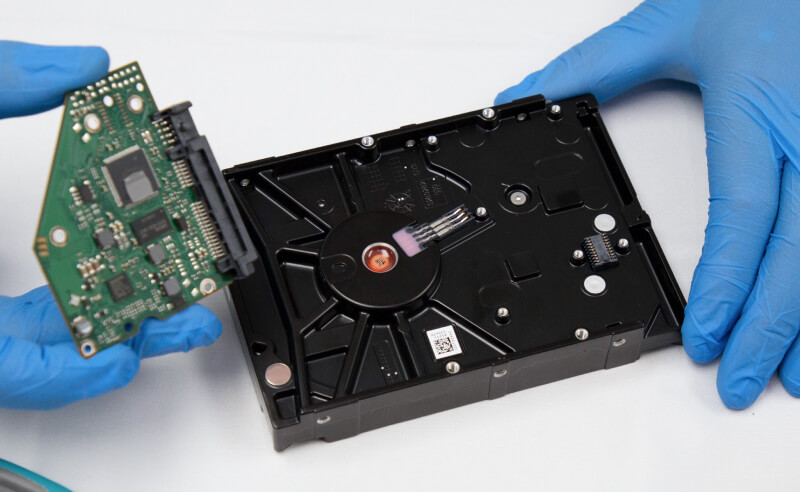
The spindle motor can spin up and show no clear signs of hard drive failure in disks with corrupted firmware. Yet, the system will fail to recognize the device. Given the symptoms, many users assume a failed PCB or connection issues and troubleshoot that angle. These methods take time and will not address firmware corruption. Running the drive in the meantime could also put stored data at risk.
If the PC fails to detect the hard drive, then a thorough firmware evaluation is the best place to start.
How Data Recovery Software Makes Firmware Damage Worse
Commercial data recovery software operates at the file system level. Firmware damage occurs below this layer. It manifests in the service area of the platters and the ROM chip on the PCB. Neither of which is visible to a standard diagnostic tool.
In addition, data recovery software could make the damage to the firmware much worse. When software attempts to access a drive with corrupted firmware, it tries to initialize the disk. Each failed attempt could further corrupt the firmware. This stress can destroy data in firmware modules that an engineer may have been able to repair.
Stop using the hard drive as soon as possible if it stores critical files.
You need advanced tools and techniques to recover data from a hard drive with firmware damage. While firmware failure appears to be a straightforward logical issue, it is an engineering challenge. Highly technical capabilities and expertise are vital to hard drive recovery. A service with a certified cleanroom and utilities for all major manufacturers can achieve better outcomes in these cases.
Importance of Adaptive Data
Adaptive data held in firmware modules in the service area and the ROM chip calibrates the hard drive’s behavior. It is unique to the specific set of read/write heads and platters in that exact device.
No two HDDs share identical adaptives. Not even a pair of disks from a single product line assembled simultaneously at the same factory. Therefore, rewriting damaged firmware modules with generic microcode is not an option. Firmware repair is much more complex than reflashing the drive.
Using a foreign PCB (even once) can destroy firmware in the service area. As such, blind swaps with a donor PCB are no longer an option for hard drives with firmware damage. Do not attempt a PCB transplant if you need to retrieve files. It will degrade the disk’s condition further and hinder data recovery efforts.
Specialized Tools To Rewrite Firmware
You need sophisticated hardware and software to examine a hard drive’s firmware for damage. Tools provide low-level access to the platter surface without requiring the device to load into the OS. These systems communicate with the disk through its native command set.
Using command sets developed directly by Western Digital, Seagate, Toshiba, and other companies, engineers diagnose damage in specific firmware modules. Then, they identify corrupted modules that contain shared firmware for universal functions, such as the boot sequence. If the corruption is severe, an expert can rewrite the module from a database with matching firmware revisions.
However, this process will not work for adaptive modules. In those cases, a specialist must salvage or reconstruct adaptive data in the module rather than replace it. This process is the most demanding part of repairing firmware damage.
How We Repair Hard Drive Firmware Damage
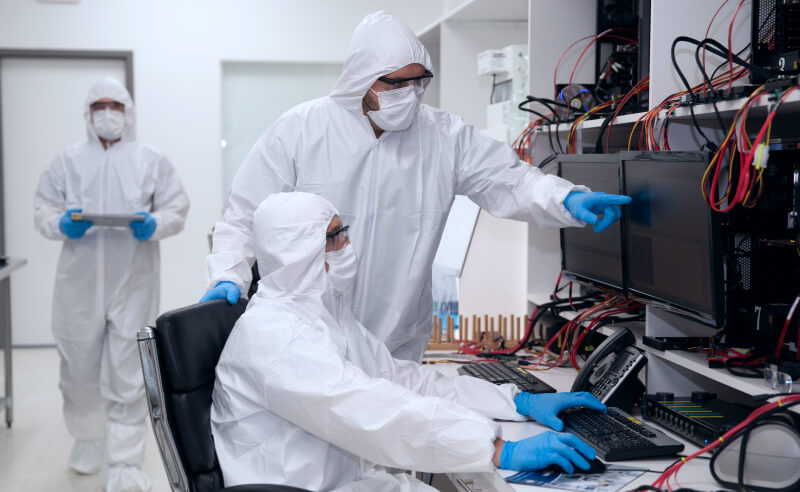
Repairing firmware damage is a precise, multi-step procedure. The experience and expertise of a data recovery service can resolve many cases that involve firmware corruption.
Step 1: Diagnose Firmware Failure
Our engineers begin by determining if damaged firmware is the primary cause of data loss. The diagnostic also screens for other failures that could complicate repairs, such as a head crash.
Step 2: Locate Damaged Firmware Modules
We send commands to the hard drive through a low-level channel and assess its response. This exchange helps us pinpoint whether the defective firmware resides on the PCB’s ROM chip or the platter’s service area.
Step 3: Salvage Damaged Modules or Rebuild Corrupted Firmware
A professional data recovery provider attempts to read the modules over multiple passes. It is possible to rewrite firmware modules and reconstruct adaptive data from partial reads to restore function. If the corruption is too severe to salvage, then engineers can sometimes run routines to recalibrate the hard drive’s parameters. This approach generates a new set of adaptive data based on the disk’s current condition.
Step 4: Test Hard Drive
Our technicians test the hard drive in a controlled environment to ensure it will initialize correctly with the repaired firmware. They monitor the device in real time and intervene if errors occur to protect the storage medium from physical damage.
Step 5: Create Bit-By-Bit Image
After confirming the HDD is stable, we create a bit-by-bit image of the disk. This step clones the drive’s contents, allowing us to work with the image rather than the target device to prevent further wear.
Step 6: Recover Lost Data
Our experts recover data from the disk image and review it. Once finished, we transfer the recovered files to an encrypted external drive or a secure server. If we are unable to recover your data, you owe nothing.
Hard Drive Firmware Repair Services
Secure Data Recovery provides desktop and external hard drive recovery services to thousands of customers worldwide. We also offer RAID data recovery for arrays with damaged controllers or member drives with firmware corruption.
Our standard service features free diagnostics, and we maintain a 96% success rate across all device types and failure scenarios. Each case also receives a No Data, No Recovery Fee guarantee for complete peace of mind.
Call 800-388-1266 or fill out a form to get a free quote and learn more about our flexible service options.
Common Questions About Damaged Firmware
How do I know if my hard drive’s firmware is damaged?
Firmware damage does not announce itself. For example, a hard drive producing strange sounds indicates mechanical failure. Corrupted firmware can display the same signs as other failure types.
These symptoms are the most common signs of firmware damage in hard drives:
- Drive not recognized by the system
- Incorrect storage capacity or file sizes
- RAW or unknown file system
- Frequent freezing during startup
If your HDD behaves oddly and typical fixes like replacing cables or trying different ports fail, then firmware damage is quite possible.
Is my data still intact if my hard drive has firmware damage?
Yes, in most cases. Firmware is microcode that dictates how the hard drive operates. It does not store user data. Firmware corruption will not affect local files on the disk unless it causes read/write head failures or platter damage. For best results, shut down the hard drive upon noticing problems.
How can you fix corrupted firmware?
We can often fix firmware corruption to recover data from a failed hard drive. Our lab has cutting-edge tools to bypass the system and access corrupted firmware modules directly. Skilled engineers can often salvage or rebuild firmware to enable the drive to initialize. At that point, we can image the device and restore the lost data.
Can data recovery software repair hard drive firmware?
No. These programs have limited insight into firmware modules because they are largely hidden from the system. In fact, running data recovery software can make the situation even worse. Power off the hard drive and contact an expert if the disk stores important data. It could be the difference between a full recovery and permanent data loss.

Timothy Burlee

Timothy Burlee is a content writer for Secure Data Recovery Services. He specializes in various topics in the data industry, including data recovery technology, storage devices, and digital forensics. Throughout his career, he has covered complex concepts and provided accessible solutions for users. Before joining Secure Data, he worked as a freelance technical writer.





.png)
