


If your hard drive is making strange clicking or beeping sounds, has disappeared from your computer, or is showing error messages, a failed read/write head could be the cause. It's one of the most common reasons hard drives fail, and also one of the riskiest to fix.
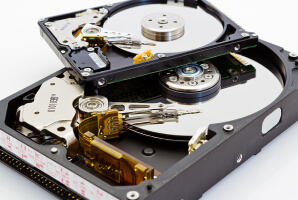
Read/write heads are the tiny components that read and write data on the spinning platters inside your drive. When they fail, the drive often can't be repaired with a simple fix, and the way the issue is handled can be the difference between getting your data back and losing it for good.
What To Know:
- Read/write heads must be replaced instead of repaired.
- Continued use will worsen damage and data loss.
- Head swaps require professional labs, tools, and techniques.
- Engineers replace heads with suitable donor parts to recover data from the hard drive.
- You can always request help to speak with a data recovery expert.
Here's a quick look at how read/write heads work, and what happens when they fail:
Can Read/Write Heads Be Repaired?
Not exactly. Read/write heads are replaced rather than repaired, since they are far too small and precise to fix once damaged. Most failures happen when a head crashes into the platter or simply wears out over time.
Replacing the head is the only reliable way to get a hard drive working again, and once that's done, recovering the data becomes possible. It might sound like a quick fix, but the process is far more delicate than it appears.
What Happens if You Keep Using a Drive With a Bad Head
If your hard drive has a damaged or misaligned read/write head, continuing to use it can make things much worse, often within minutes.
As the head struggles to position itself correctly, it can scratch the platter surface underneath it, causing a deeper and far more serious type of damage.
A struggling head can cause:
- Scratches on the platter surface as it tries to position itself
- Deeper, more severe damage that spreads with continued use
- Unreliable reading and writing, even from a head that's only slightly worn
A failed head will not fix itself. The longer the drive keeps running, the higher the risk that your data becomes permanently unrecoverable.
Why Head Replacements Require Certified Service
Replacing a read/write head isn't as simple as swapping in a spare part. Heads are calibrated to a specific model number, firmware revision, and head map, and they must match the adaptive data stored on the drive's PCB and platters. If those parameters don't align, the drive won't function properly, even with a brand new head installed.
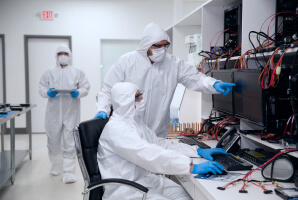
This level of precision requires a certified cleanroom to protect the platters from dust and debris during the repair, along with custom tools designed to remove and replace heads without causing further damage. It's a process that depends entirely on having the right parts, equipment, and expertise on hand, which is exactly why this kind of repair should always be handled by a certified data recovery service.
How We Fix Bad Read/Write Heads
Our hard drive recovery services feature:
- Class 10 ISO 4 Cleanroom
- Advanced Hardware and Software
- Large Library of Donor Parts
These capabilities often allow us to recover data from hard drives with failed read/write heads. Even when other companies declare it as unrecoverable.
Step 1: Diagnose Read/Write Head Failure
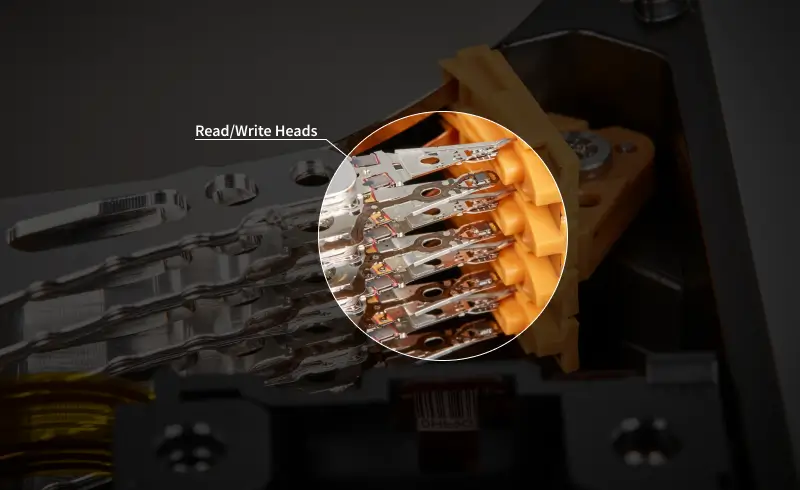
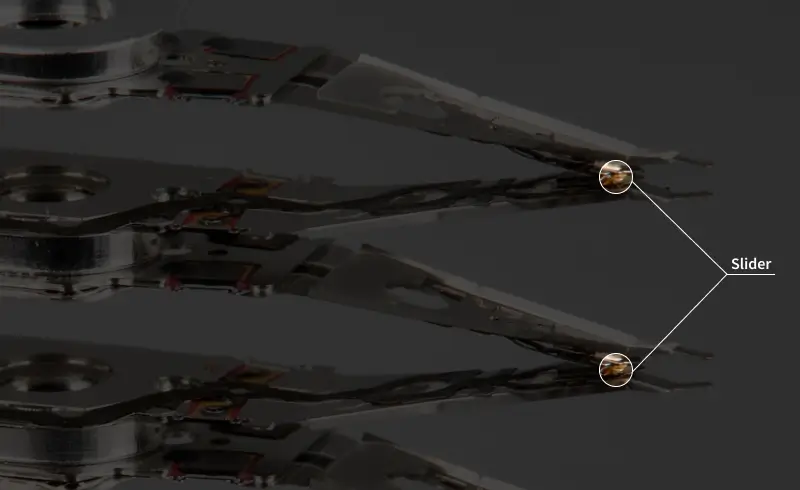
We diagnose the hard drive inside a state-of-the-art cleanroom as it arrives at a lab. Our engineers determine the root cause of data loss. In these cases, they assess whether the whole head stack assembly (HSA) or a specific element on a slider failed. Each detail shapes the recovery effort.
Step 2: Evaluate Platter Damage
During diagnostics, our experts examine the drive’s platters under a microscope for scratches and contaminants. This inspection helps influence the case’s approach and limitations as well. Severe platter damage will result in partial data loss.
Step 3: Identify Donor Parts
Our team finds compatible donor parts to replace the read/write heads in the failed disk. Sourcing these components requires insights into HDD models, release dates, and production sites. A service that maintains an extensive collection of donor parts can minimize delays and maximize the chance of a full recovery.
Step 4: Remove the Damaged Heads
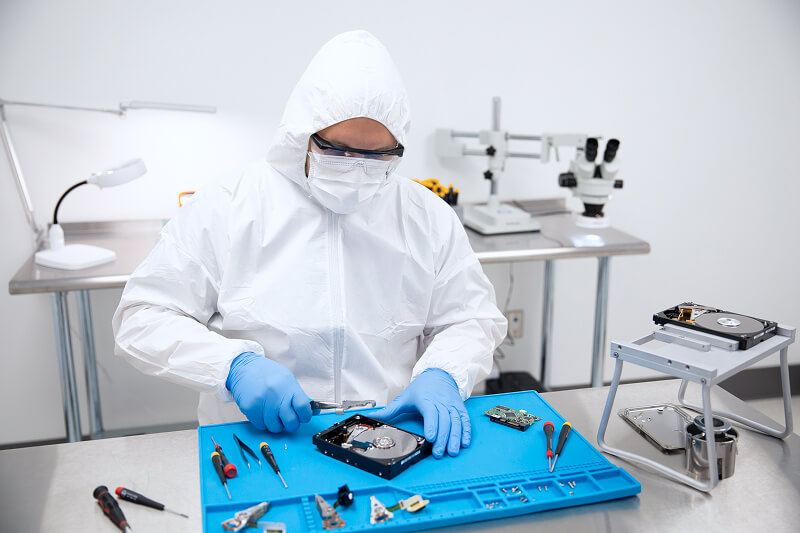
After finding a donor drive, engineers disassemble the device to swap heads. This step demands constant focus to avoid mistakes and precision tools designed for head replacements. Any contact with the platters during HSA removal can jeopardize the data stored on the disk.
Step 5: Install the Replacement Heads
The replacement heads are swapped to the target hard drive with an incredible amount of caution. Donor heads must be seated to the exact level as the old parts, with the same tolerance. Otherwise, the hard drive will not correctly retrieve data from the platters.
Step 6: Image the Hard Drive
Once the head swap is complete, we connect the drive to a professional imaging system. The system creates a sector-by-sector copy of the hard drive’s contents. Working to recover data from the disk image preserves the original files and protects the device from further stress. Weak signals are carefully processed to capture as much data as possible.
Step 7: Recover Your Data
Our specialists locate, reconstruct, and verify files from the HDD’s image. We transfer all recovered data to an encrypted external drive or a secure file server ahead of delivery.
Choosing Hard Drive Repair Service for Head Failure
Secure Data Recovery has engineers with decades of experience with hard disk drives, including head replacements.
We are the only data recovery service with a Class 10 ISO 4 cleanroom. This highly controlled environment exceeds the industry standard by a factor of ten. Our engineers also have access to cutting-edge tools that enable us to achieve the best outcomes possible. That is why our service features a risk-free process and a No Data, No Recovery Fee guarantee.
Call 800-388-1266 or fill out our form to get a free quote and start a case if you suspect read/write head failure.
Frequently Asked Questions
What are the signs of read/write head failure?
Common symptoms of read/write head failure include:
- Clicking or grinding in use
- Beeping on startup
- Not recognized in BIOS and Disk Management (Windows) or Disk Utility (macOS)
- System crashes and freezing
- File access errors
These warning signs are often evidence of failed read/write heads. Stop using the hard drive if the stored data is essential. It could damage the magnetic platters.
Can you replace read/write heads on any hard drive?
Yes. We specialize in both desktop and external hard drive data recovery. Our engineers have experience with models from all manufacturers, including dual-actuator and helium drives. No matter the hard drive, we can replace the read/write heads to recover data from the platters.
How long does replacing read/write heads take?
The duration of data loss cases due to read/write head failure varies. Hard drives with more platters take longer to image and transfer. On occasion, read/write heads need to be replaced multiple times to extract the maximum amount of data.
We provide customers with flexible service options to meet a wide range of budgets and timelines.
What is the success rate for hard drive data recovery involving a head swap?
The success depends heavily on the extent of the platter damage. Our data recovery experts have a documented 96% success rate across all cases. However, even the best engineers and most sophisticated tools cannot recover data if the disk’s magnetic layer is destroyed.
For that reason, we offer a free quote with transparent pricing and a No Data, No Recovery Fee guarantee. You get your data back, or pay nothing.

Timothy Burlee

Timothy Burlee is a content writer for Secure Data Recovery Services. He specializes in various topics in the data industry, including data recovery technology, storage devices, and digital forensics. Throughout his career, he has covered complex concepts and provided accessible solutions for users. Before joining Secure Data, he worked as a freelance technical writer.





.png)
