


Ransomware is no longer a threat that’s limited to highly skilled cybercriminal groups. Ransomware-as-a-Service has become more common in recent years — as a result, attackers can easily get their hands on ready-made tools, payment systems, and support networks without having to build malware from scratch. Meanwhile, AI is making phishing emails, fake messages, and social engineering attempts a lot more convincing and easier to scale.
For individuals, small businesses, and large enterprises alike, the result is the same: ransomware can lock up your important files, disrupt daily operations, expose sensitive data, and create a real pressure to act quickly, even if it means paying the ransom.
The right response can make a major difference. In this guide, we’ll explain what to do immediately after a ransomware attack, how data recovery could help, and how to prepare before ransomware reaches your devices.
What Is Ransomware?
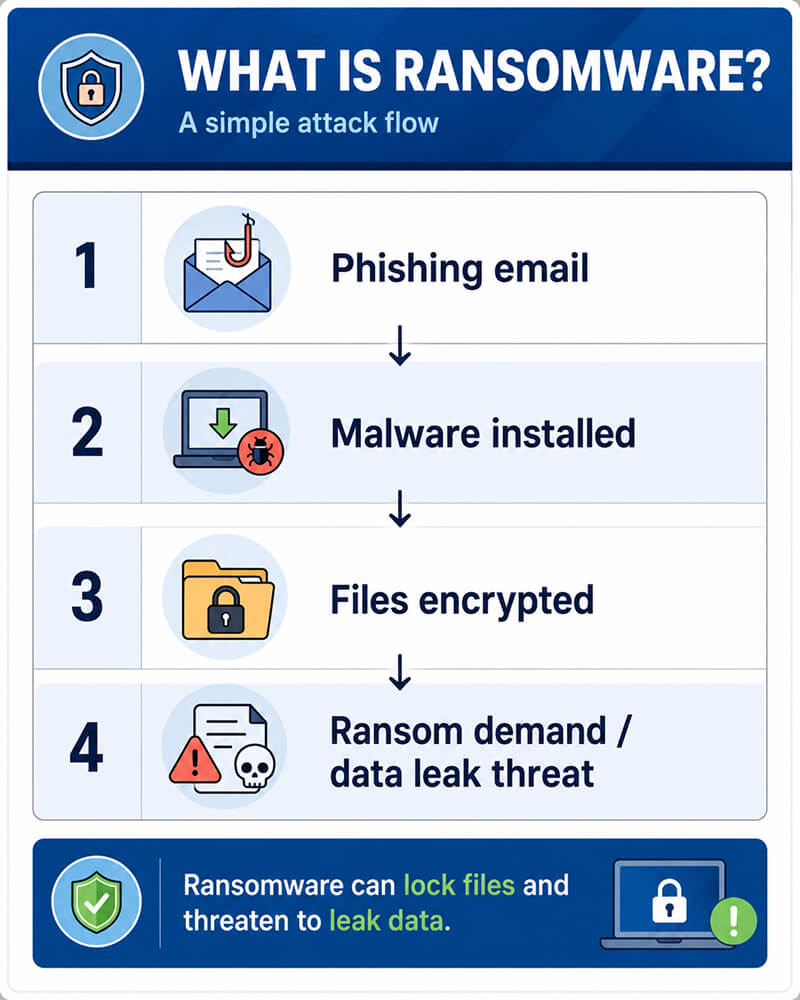
Ransomware is a type of malware that blocks access to your files, systems, or devices until you pay the ransom. Often, it encrypts the victim’s files so they can’t be opened without a decryption key. In other cases, attackers may lock entire systems or threaten to leak the stolen data.
Ransomware attacks can begin in several ways. Here are a few common entry points:
- Phishing emails
- Malicious attachments or links
- Compromised passwords
- Remote access vulnerabilities
- Infected downloads or removable drives
- Weak backup and access control practices
Nowadays, ransomware tends to be about more than file encryption. Many cybercriminal groups now use “double extortion” tactics: where they steal sensitive data before encrypting systems. If the victim refuses to pay, the attackers may threaten to publish, sell, or leak that data.
This makes ransomware a problem on two fronts: it’s both a data recovery problem as well as a data security problem. The goal isn’t just to restore access to your data, but also to understand what exactly was affected, and to protect any remaining recoverable data.
Why Ransomware Attacks Are Rising
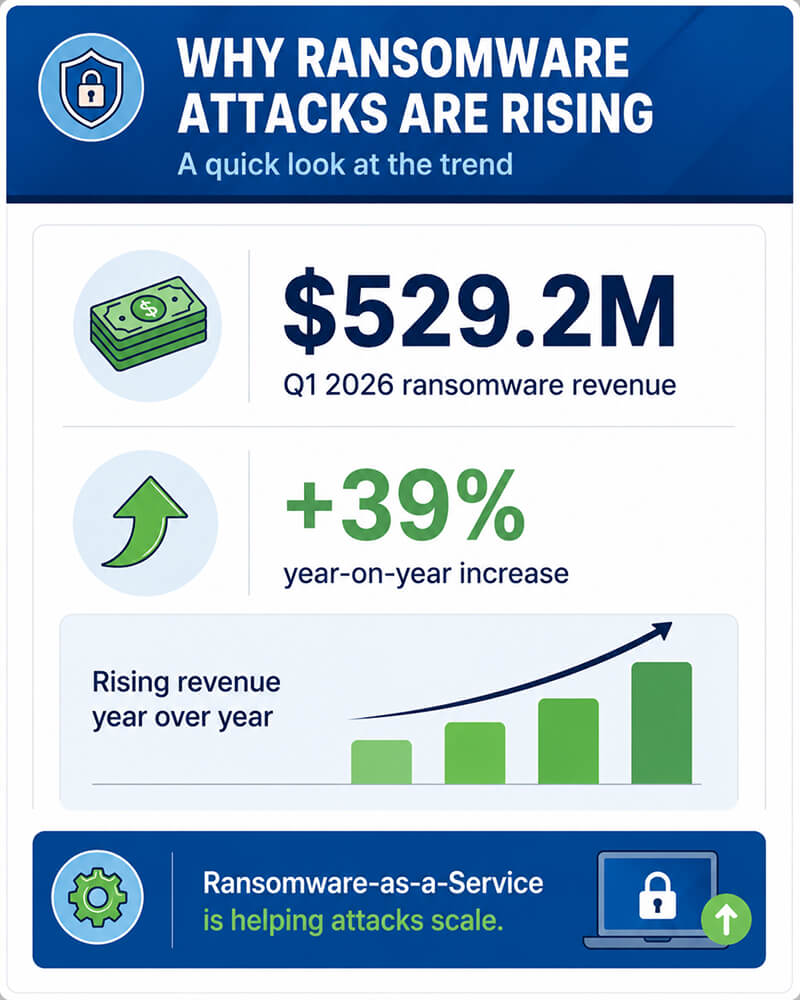
Ransomware attacks are on the rise for three main reasons: it has become easier to launch, harder to spot, and more difficult to contain. According to cybersecurity research group Rapid7, ransomware groups generated an estimated $529.2 million in Q1 2026 — a 39% year-on-year increase.
Ransomware-as-a-Service
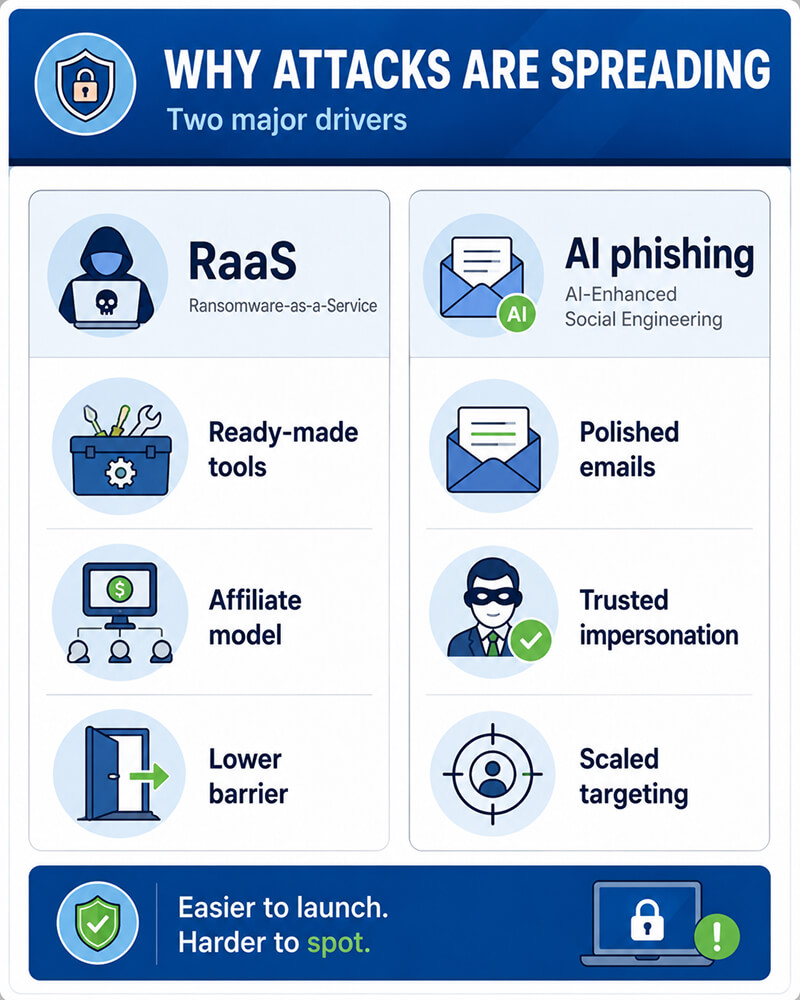
Ransomware-as-a-Service has lowered the technical barrier for attackers. Instead of having to build malware from scratch, criminals can use ready-made ransomware tools, payment portals, leak sites, and affiliate networks. This means that less technically capable attackers can launch ransomware campaigns, while more experienced groups provide them with the infrastructure they need behind the scenes.
AI-Enhanced Social Engineering
AI is also helping to make ransomware campaigns more convincing. Using AI tools, attackers can write more polished phishing emails, tailor messages to specific industries, impersonate trusted contacts, and automate various parts of the targeting process.
This is a far cry from phishing emails in past years, where poor grammar or formatting often made them easy to spot. Overall, as a result of AI-enhanced phishing campaigns, malicious emails and fake requests are a lot harder for employees or individuals to recognize.
More Valuable Data in More Places
Nowadays, both businesses and individuals store sensitive data across more devices and platforms than in the past. Files tend to be spread across laptops, cloud storage, external drives, home offices, personal devices, and shared business systems. Every additional storage location creates another possible weak point.
For these reasons, ransomware preparation isn’t just about stopping an attack. It’s also making sure that your critical data can still be found, protected, and recovered if prevention fails.
What to Do Immediately After a Ransomware Attack
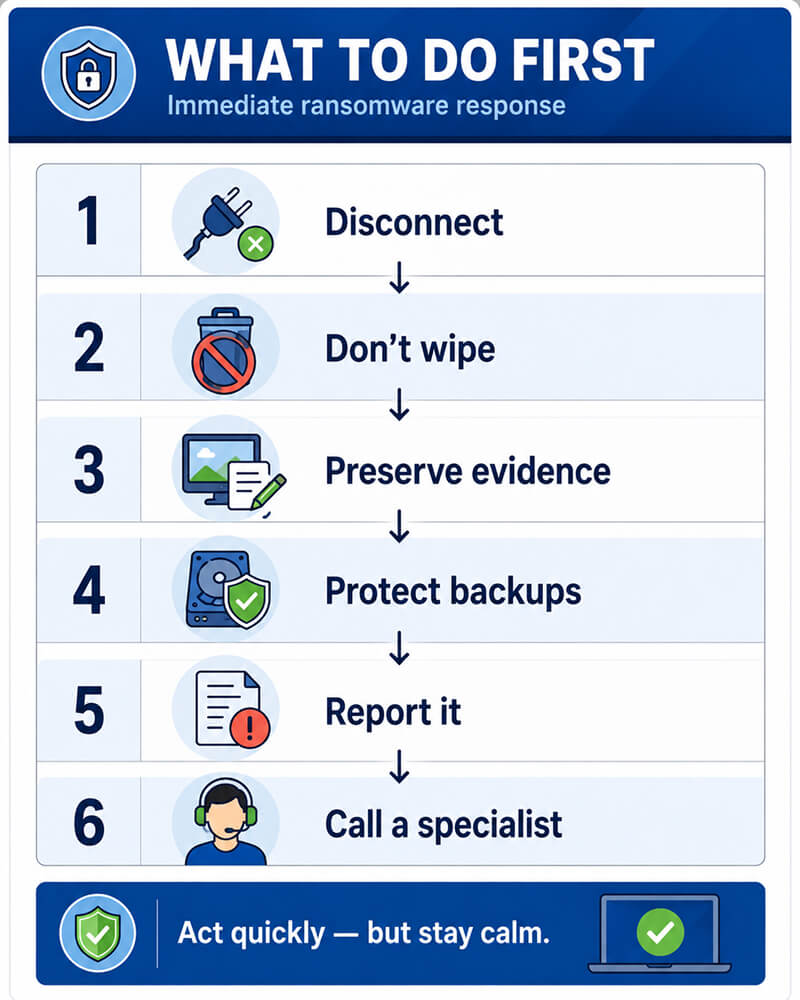
Falling victim to a ransomware attack can be stressful, and it’s normal to feel a sense of panic immediately after it happens — but the first steps you take matter. Acting quickly and carefully can help you limit the damage and protect data that may still be recoverable.
- Disconnect affected devices from the network. Unplug any Ethernet cables, turn off your Wi-Fi, and disconnect shared drives where possible. This can help stop ransomware from spreading to your other systems, backups, or network storage.
- Don’t rush to restart, wipe, or reinstall systems. Sudden changes can remove useful evidence, and can affect your recovery options. If you are part of a business, contact your IT or incident response team before making any major changes.
- Preserve all evidence. Keep the ransom notes, file extensions, screenshots, suspicious emails, affected devices, and any error messages. This information can be useful down the line to help identify the type of ransomware you’re dealing with, and guide your next steps.
- Don’t immediately pay the ransom. Paying doesn’t guarantee you'll get your files back. And worse still, it can also signal to the attacker that you’re willing to pay — this could encourage further attacks and expose you to additional risks.
- Protect your backups. If you have any backup drives or storage connected to your affected computer, disconnect them immediately. If your backups are connected during an attack, they could also be encrypted or damaged.
- Report the incident. Businesses may need to notify IT teams, cyber insurers, legal advisers, regulators, or law enforcement, depending on the systems and data involved. As an individual, it’s worth reporting it to your local law enforcement.
- Contact a recovery specialist if your data is important. A professional assessment can help determine whether clean backups, unaffected drives, previous file versions, or recoverable data still remain and can be used.
Making the wrong first move can make ransomware recovery harder. However, if you take steps to contain the issue, document everything that has taken place, and follow expert guidance, you can reduce the damage and improve your chances of safely restoring your important files.
Can Data Be Recovered After Ransomware?
Data recovery after ransomware is sometimes possible — but it depends on the specifics of the attack. The type of ransomware, the extent of encryption, the condition of your affected devices, and the quality of your backups are all key factors that affect whether you can recover your data.
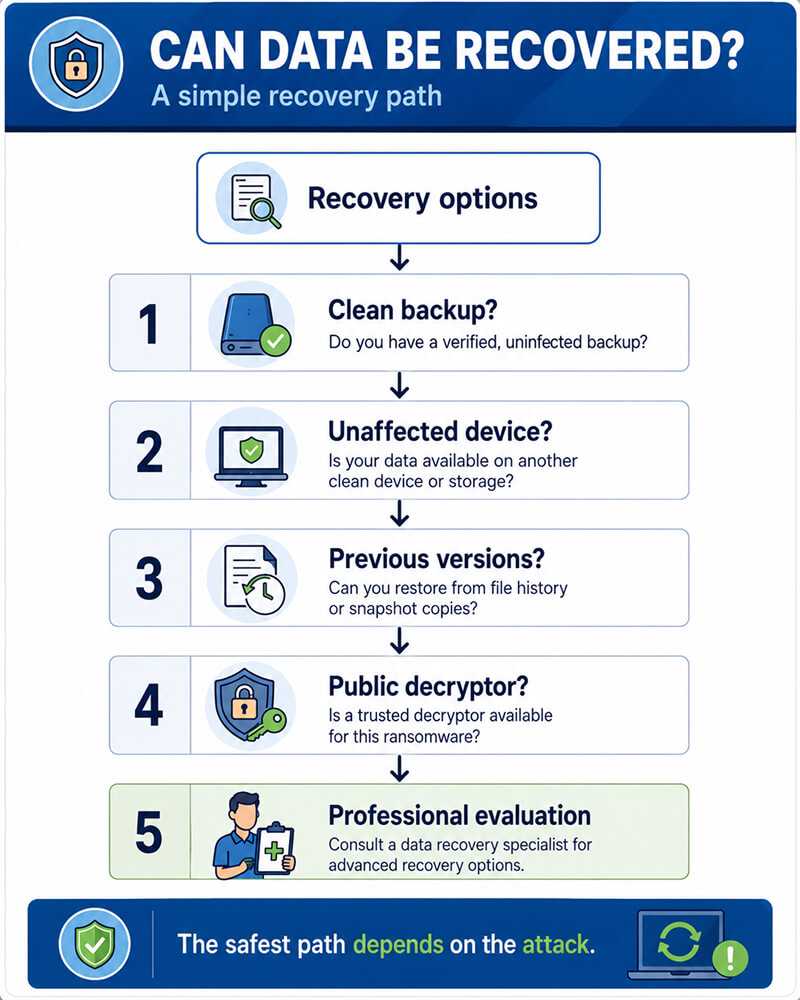
In some cases, encrypted files can’t be decrypted without the attacker’s key. But that doesn’t necessarily mean that there aren’t any other recovery paths you can take.
Possible recovery options may include:
- Restoring from clean backups that were offline, isolated, or immutable when the attack happened
- Recovering data from unaffected drives or systems that the ransomware was unable to reach
- Checking previous versions or shadow copies, if they still exist on your system and weren’t deleted during the attack
- Evaluating locked, encrypted, or damaged devices to identify whether any of your data may still be accessible
- Checking for public decryptors for known ransomware variants
Often, your safest first step when important data is involved is a professional evaluation. At Secure Data Recovery, we can assess hard drives, SSDs, RAID arrays, external drives, and other storage devices that have been affected by ransomware-related data loss.
The goal during these evaluations is to identify clean copies, recoverable data, and the best step forward for your specific case without making the damage worse.
Why Backups Are Not Always Enough
Backups are one of the best defenses you can implement against ransomware. However, they only help if they're complete, clean, recent, and recoverable. If your backup can’t be restored safely, it likely won’t offer much protection during a real attack.
Here are a few common issues that backup plans can face:
- Backups were connected during the attack and were encrypted by the attacker, along with the original files
- Cloud sync copied encrypted files, overwriting the clean versions
- Backups were incomplete or outdated, and left important data missing
- Restore processes were never tested, so recovery doesn’t work when it matters most
- Cloud backup credentials were compromised, giving attackers access to your online copies
- Critical files were stored outside your backup plan, such as on local desktops, external drives, or personal devices
The strongest backup strategy starts with the 3-2-1 backup rule: keep three copies of important data, stored on two different types of media, with one copy kept offsite and offline. To best protect yourself against ransomware, it’s particularly important that you keep one backup isolated, or otherwise protected from everyday internet access.
Test your restores regularly, separate backup accounts from daily-use accounts, and keep an updated inventory of all your most important data. The goal isn’t just to have backups, but to know that you can trust them when you need urgent recovery.
How To Prepare Before Ransomware Strikes
The best way to prevent ransomware attacks is through a layered approach. No single tool can stop every attack, so your goal is to minimize risk, slow down attackers, and make your recovery faster if anything does go wrong.
Strengthen Access Controls
Use strong, unique passwords, and enable multi-factor authentication whenever it’s an option — especially for email, cloud storage, remote access tools, and administrator accounts. For businesses, you should also limit admin privileges and use separate accounts for sensitive systems.
Keep Your Systems Updated
Many ransomware attacks exploit known vulnerabilities that have already been patched, and failing to update your devices on time can leave them exposed. Install updates for your operating systems, browsers, business software, firmware, and remote access tools.
Train Users to Spot Phishing
For businesses, it’s important to keep your employees and coworkers educated on how to spot phishing. Ransomware often starts with a simple but convincing email, link, invoice, or attachments. In general, it’s best to be cautious when it comes to unexpected messages, urgent payment requests, password reset links, and files from unknown senders.
Segment Important Data
Businesses should avoid giving every user access to every folder. Limit user access based on roles, and keep critical systems and files separated where possible. As an individual, you can employ a similar principle by separating your everyday files from important archives and backups.
Build an Incident Response Plan
When disaster strikes, it’s important to know who to call, what to disconnect, where your backups are stored, and how to document the incident — especially as a business. As an individual, understand how to disconnect and isolate your devices, protect your backups, and get help before making any risky changes.
Where SecureDrives Fit Into a Ransomware Protection Strategy
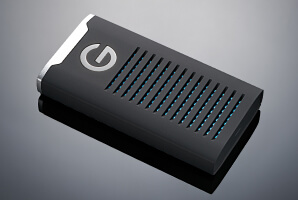
SecureDrives and SecureUSB devices aren’t a replacement for cybersecurity software, employee training, and tested backup plans. However, they can bolster your ransomware protection strategy by helping you protect your sensitive data at rest, and keeping your important backup files offline when you’re not using them.
For individuals, remote professionals, and businesses, encrypted external storage devices can help secure your files that need to be transported, archived, or stored separately from everyday systems. This is especially important for regulated industries, remote work, client records, financial documents, and other sensitive data.
SecureDrives and SecureUSB can help your ransomware preparedness by offering:
- Hardware encryption for sensitive files and backups
- Secure offline storage for files that shouldn’t stay connected to a network
- Auto-lock and access controls to reduce exposure if your device is lost, stolen, or when you leave it unattended
- SecureUSB options with DriveSecurity antivirus scanning to help check your removable drive for malware before accessing your files
- Portable protected storage for individuals, remote workers, and businesses with sensitive data
Remember, encrypted drives still need to be used correctly. Disconnect them when you’re not using them, protect your access credentials, store them safely, and include them as one layer in a wider backup and incident response plan.
When to Contact a Professional
If you’re dealing with a ransomware attack that has encrypted your important files, and you either don’t have access to your backups, or they’re damaged, encrypted, incomplete, or untested, your best bet is to contact a data recovery specialist.
You should also seek help if the affected system involves a storage device that appears to be failing. This could be a hard drive, SSD, RAID array, NAS device, external drive, or any other storage media.
Professional support may be the safest option if:
- Your affected data is critical, regulated, or irreplaceable
- You need a forensic image before starting a recovery attempt
- You’re unsure whether restoring from backup could overwrite recoverable data
- Ransomware has affected multiple devices, users, or storage locations
- You want to understand which data may still be recoverable
At Secure Data Recovery, we can provide professional diagnostics, secure handling, forensic imaging, and recovery from multiple storage types. With our No Data, No Recovery Fee guarantee, you only pay if we successfully recover your files.
Prepare Now, Recover Safely Later
Ransomware is becoming a lot easier to launch and harder to spot, but with the right preparation, you can reduce the damage it could do. If an attack happens, act quickly but calmly. Isolate your affected systems, preserve evidence, avoid rushed ransom payments, and protect your backups from further exposure.
Before an attack happens, make sure you build a thorough, layered prevention plan. Use strong access controls, keep your systems updated, test your backups, and store sensitive backup copies securely. SecureDrives and SecureUSB devices can help you protect your important files and offline backups — but it’s important to use them as part of a broader data protection strategy.
If ransomware has locked, damaged, or compromised your important data, we’re here to help. Secure Data Recovery can evaluate your device and help you identify the safest recovery path for your specific circumstances.
Give us a call at 1-800-388-1266 or start a case online to start taking back control of your data today.

Monica J. White

Monica is a tech journalist with a lifelong interest in technology. She first started writing over ten years ago and has made a career out of it, with a particular focus on PCs, mobile devices, SaaS, and cybersecurity. She enjoys the challenge of explaining complex topics to a broader audience, whether it's how semiconductors work or how to back up your data. Her work has previously appeared in Digital Trends, Tom's Hardware, Pay.com , SlashGear, Forbes, Springboard, Looper, Money, WePC, and more.








.png)
